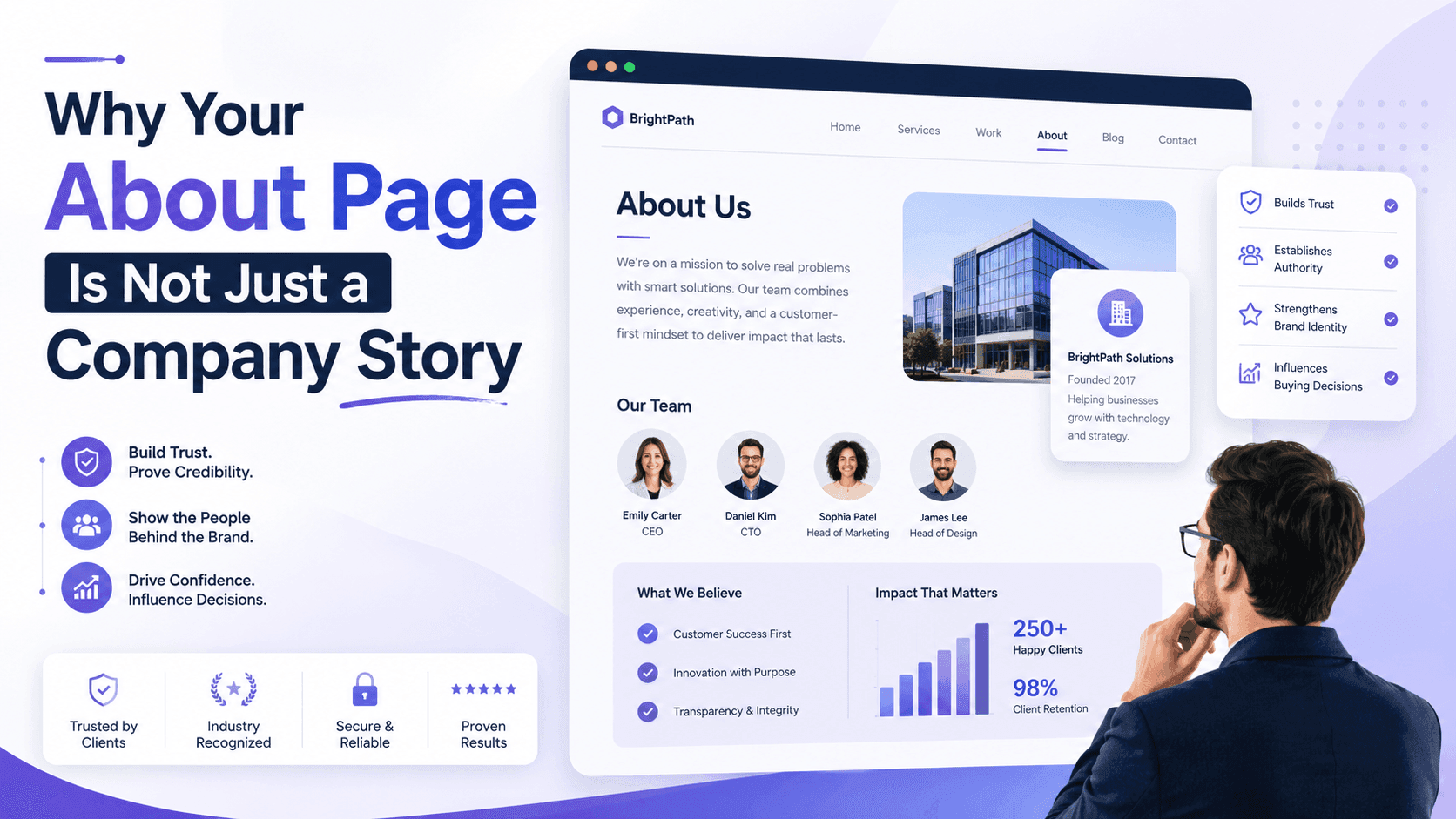


A service page has two jobs. It must help the right people find your business, and it must give them enough confidence to contact you.
Many pages only do one of those jobs well. Some rank for useful searches but feel vague once visitors arrive. Others look polished but never appear when potential customers search for the service.
Strong service page SEO connects search intent, useful information, trust, and a clear next step. The page should explain what you offer, who it helps, how it works, and why someone should choose your business.
That sounds simple. In practice, many service pages become a soup of keywords, bold claims, and buttons shouting “Get Started.” Let us avoid that particular recipe.
Before Writing, Decide Exactly What the Page Must Do
Good service pages begin with planning, not word count. Before writing a headline, decide what the page should rank for and what the visitor should do after reading it.
Match One Page to One Primary Search and Buying Intent
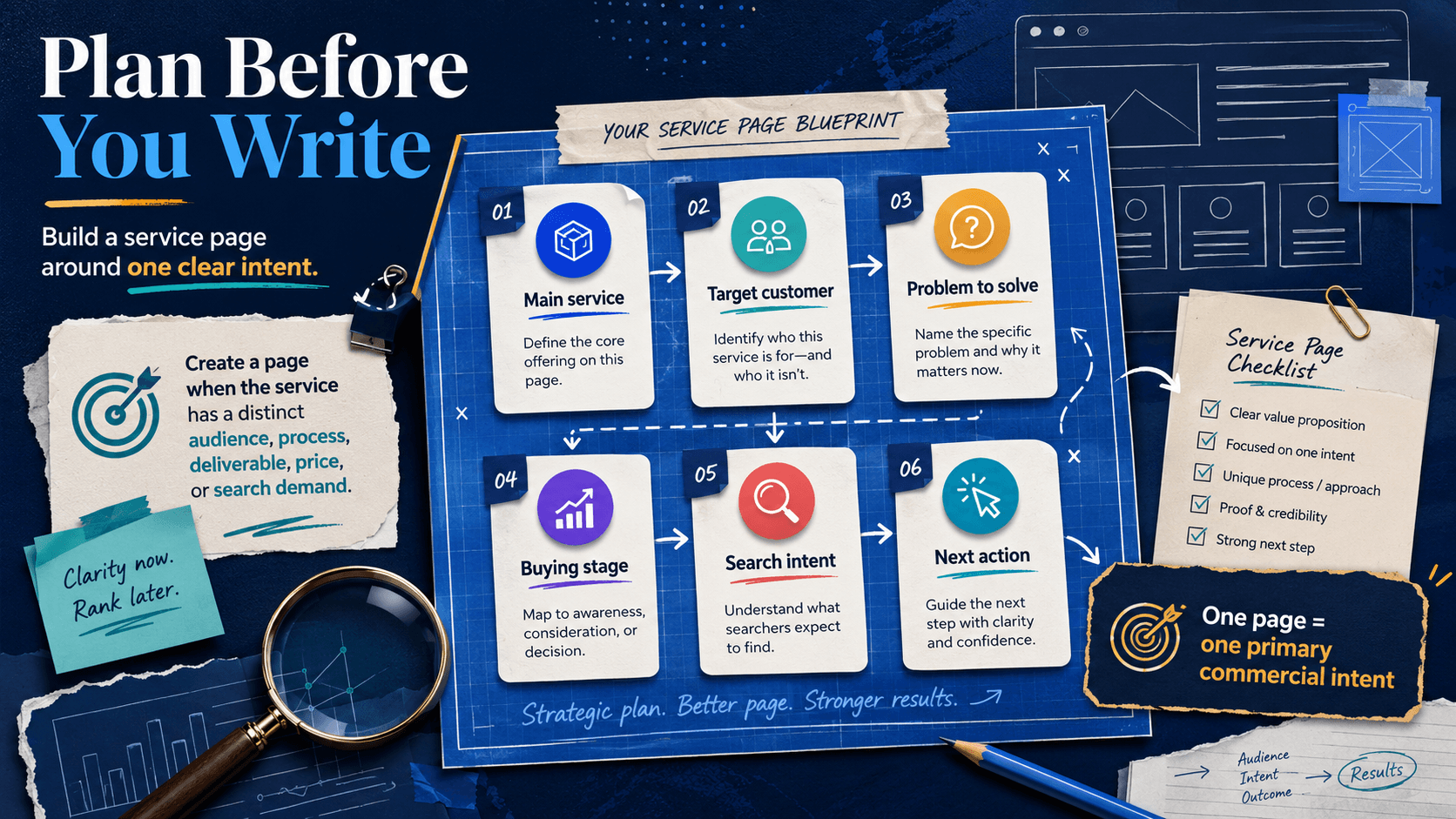
Each service page should focus on one main commercial intent.
A visitor searching for “what is website maintenance” may only want information. A visitor searching for “website maintenance company” is more likely to compare providers.
Both searches relate to the same service, but they need different pages or different levels of detail.
Identify:
- The main service
- The intended customer
- The problem they want solved
- Their stage in the buying process
- The action they should take next
This focus makes the page easier for people and search engines to understand.
Decide Whether the Service Needs Its Own Page
Not every service needs a separate page.
Create one when the service has a distinct audience, process, deliverable, price, or search demand. For example, ecommerce development and mobile app development usually deserve separate pages because the buyer needs, tools, and outcomes differ.
Combine services when they are minor parts of the same offer. Creating a new page for every tiny variation can lead to thin content and keyword overlap.
If several pages explain almost the same thing, they may compete with each other. Search engines then have to guess which page matters most. Search engines have enough to do already.
Map the Service to Related People, Problems, and Outcomes
A useful page should cover more than one keyword.
Map the service to the ideas surrounding it:
- Target customers
- Common problems
- Deliverables
- Tools and platforms
- Process stages
- Industries
- Expected outcomes
- Limitations
- Related services
- Proof of experience
This is a central part of service page SEO. It creates natural topic depth and helps the page answer real buying questions without repeating one phrase in every paragraph.
Build the Page in the Order a Buyer Needs Answers
People rarely read a service page from top to bottom like a novel. They scan for answers.
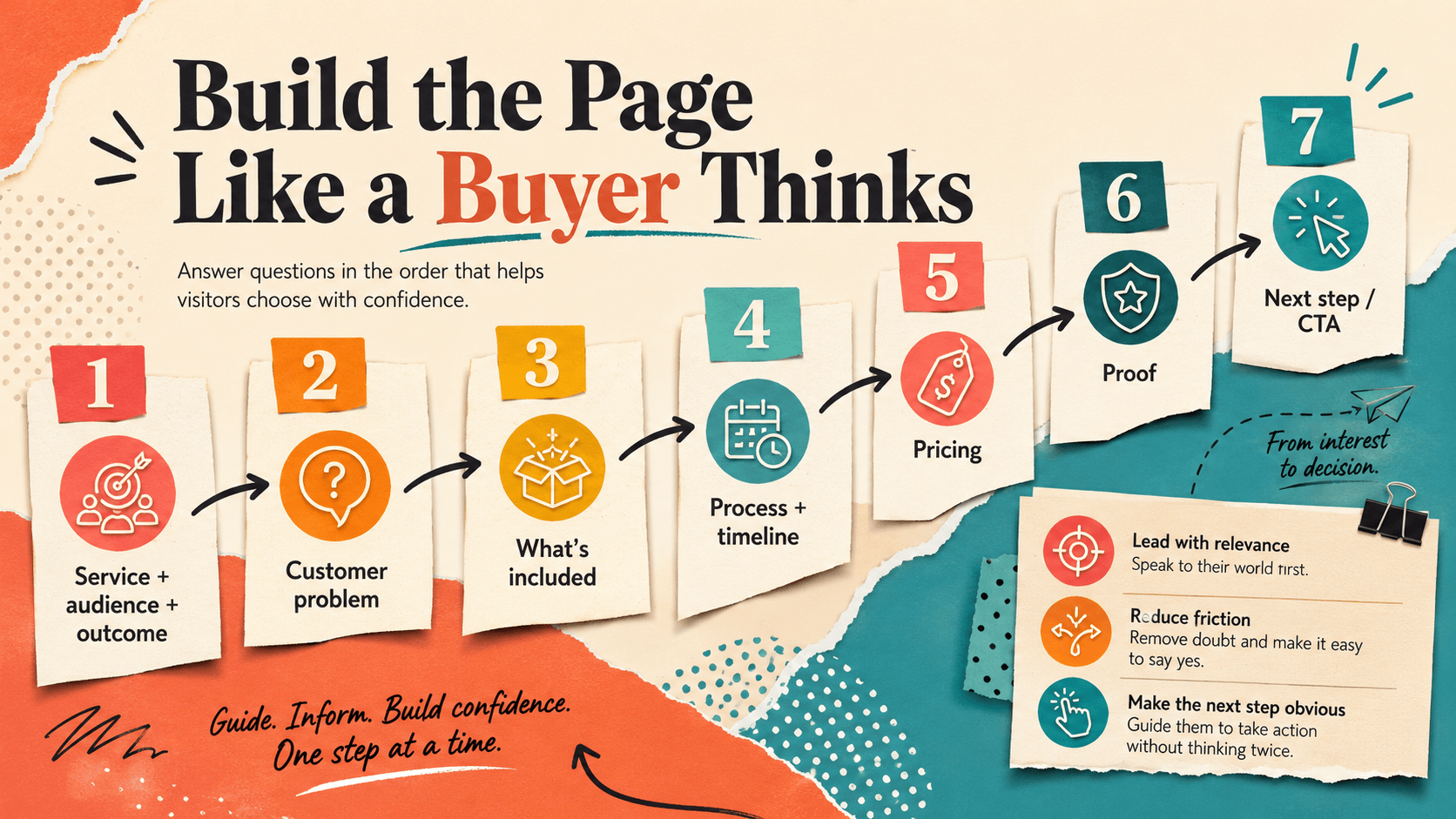
A strong structure follows the order in which buyers usually think. First, they want to know whether the service is relevant. Then they check scope, process, proof, cost, and next steps.
Lead With the Service, Audience, and Outcome
The top section should explain three things quickly:
- What service you provide
- Who it is for
- What result it supports
The H1 should name the service clearly. The supporting copy should explain the outcome in plain language.
Add one primary call to action, such as “Request a Quote” or “Book a Consultation.” A secondary link can lead to pricing, work samples, or a case study.
Avoid starting with company history. Visitors do not need the founder’s childhood dream before they know what the service does.
Show That You Understand the Customer’s Problem
Describe the situation that normally causes someone to search for the service.
A company looking for conversion rate optimization may be getting traffic but few sales. A business seeking app development may have an idea but lack the technical team to build it.
Mention the cost of leaving the problem unresolved, but do not turn the page into a disaster movie.
The goal is recognition. The right visitor should think, “Yes, that is exactly what is happening.”
Explain What the Service Includes and Excludes
Clear scope improves trust and lead quality.
Explain the main deliverables, optional add-ons, supported platforms, number of revisions, maintenance terms, and anything that requires a separate quote.
Also state what the service does not include when that detail may prevent confusion.
For example, a website design package may include page layouts and responsive development but exclude copywriting, hosting, and ongoing SEO.
This clarity saves time for both the customer and the sales team.
Describe the Process, Timeline, and Client Responsibilities
A simple process section makes the service feel less risky.
Break the work into clear stages. For each stage, explain what your team does, what the client provides, and what is delivered.
A typical process may include:
- Discovery and requirements
- Research and planning
- Production or development
- Review and revisions
- Launch or handoff
- Ongoing support
Mention realistic timelines and the factors that may affect them. Client feedback, missing assets, and scope changes often cause delays. It is better to explain that early than to discover it during week seven with everyone staring at the calendar.
Address Pricing and Explain the Next Step
Pricing is one of the first things buyers look for, even when they politely pretend otherwise.
You do not always need to publish a fixed amount. You can provide:
- Starting prices
- Typical ranges
- Package levels
- Hourly rates
- Factors that affect cost
- A custom estimate process
Explain what happens after someone contacts you. Tell them how quickly your team responds, what information they should prepare, and whether the next step is a call, audit, proposal, or quote.
Write Copy That Makes the Service Easier to Choose
A page should not only describe the service. It should help the visitor compare options and make a decision.
Clear writing, useful detail, and honest limits often convert better than loud claims.
Connect Every Feature With a Useful Outcome
Features explain what the service includes. Benefits explain why those features matter.
“Weekly reports” is a feature. “Weekly reports help you spot delays and make decisions before small issues grow” is a useful outcome.
“Responsive development” is a feature. “Responsive development keeps the website usable across phones, tablets, and desktop screens” explains the benefit.
Replace vague claims such as “world-class,” “best,” and “cutting-edge” with specific information.
Show the method, result, qualification, case study, or process behind the claim. Good service page SEO works better when useful facts carry the message instead of decorative adjectives doing all the heavy lifting.
Answer Objections Before They Delay the Inquiry
Visitors often hesitate because they have unanswered questions.
Address concerns such as:
- How long will the service take?
- Can you work with an existing system?
- What does the client need to provide?
- What happens if the scope changes?
- Is support available after completion?
- Why does this cost more than a cheaper option?
- Who is this service not suitable for?
Answer these questions calmly. Objection handling should reduce uncertainty, not corner the reader into a decision.
Optimize the Page for Search Without Flattening the Message
Optimization should make the page clearer. It should not turn it into a parade of repeated phrases.
The best service page SEO helps search engines understand the offer while keeping the writing natural for people.
Use the Main Keyword With Supporting Topic Language
Place the main keyword in important areas when it fits naturally:
- Page title
- H1
- Opening section
- One relevant subheading
- Body copy
- Internal link text
- Image descriptions
Then support it with related language.
A web design service page may also discuss user experience, mobile responsiveness, content structure, accessibility, page speed, CMS platforms, design revisions, and launch support.
This wider context explains the service properly. It also prevents the writing from sounding as if one keyword has rented every room in the building.
Optimize the Title, URL, Headings, and Search Description
Use a short and descriptive URL. Keep one clear H1 and organize the content with logical H2 and H3 headings.
Write a unique title tag that names the service and gives people a reason to click. The meta description should summarize the offer and encourage the right visitor to open the page.
Use descriptive image alt text where it helps users understand the image. Do not stuff keywords into every image label.
At Trifleck, we use a clean structure that supports usability, accessibility, and search visibility, making it more likely for traffic to rank and convert.
Connect the Service Page to the Rest of the Website
Internal links show how the service fits within the wider business.
Link the page to relevant content such as:
- The main services page
- Related services
- Case studies
- Industry pages
- Helpful blog posts
- Pricing information
- The About page
- The contact page
Use descriptive anchor text. “View our ecommerce development process” is more useful than “click here.”
Internal linking also strengthens service page SEO by connecting related topics and helping search engines discover important pages.
Treat Local and Near-Duplicate Pages Carefully
A location page should offer real local value.
Include local service conditions, customer examples, team information, availability, regulations, delivery areas, or common needs in that market.
Do not create dozens of city pages that only swap one place name for another. Those pages feel empty to readers and can create quality problems.
When two pages are very similar, review whether they should be combined, rewritten, redirected, or assigned a clear canonical version.
Place Proof and Conversion Elements Where Doubt Appears
Proof works best when it appears near the claim it supports.
A testimonial about faster project delivery should sit near the process or results section. A certification should appear close to technical or regulated claims. A relevant case study can support the service outcome.
Create a Low-Friction Path From Interest to Contact
Use one main call to action across the page. Repeat it at useful decision points, such as after the opening, service scope, proof, and final section.
A secondary action can help visitors who are not ready to contact you. They may prefer to view pricing, read a case study, or download a guide.
Keep forms short. Ask only for information needed to begin the conversation.
Explain:
- Why you need the information
- How soon your team will respond
- What happens after submission
- Whether the visitor is requesting a quote or booking a call
Mobile usability also matters. Use readable text, clear spacing, large buttons, visible form labels, useful error messages, strong contrast, and fast-loading images.
Conversion buttons should be easy to tap. They should not require the thumb control of a professional gamer.
Measure Whether the Page Attracts the Right Visitors
Traffic alone does not prove the page is successful.
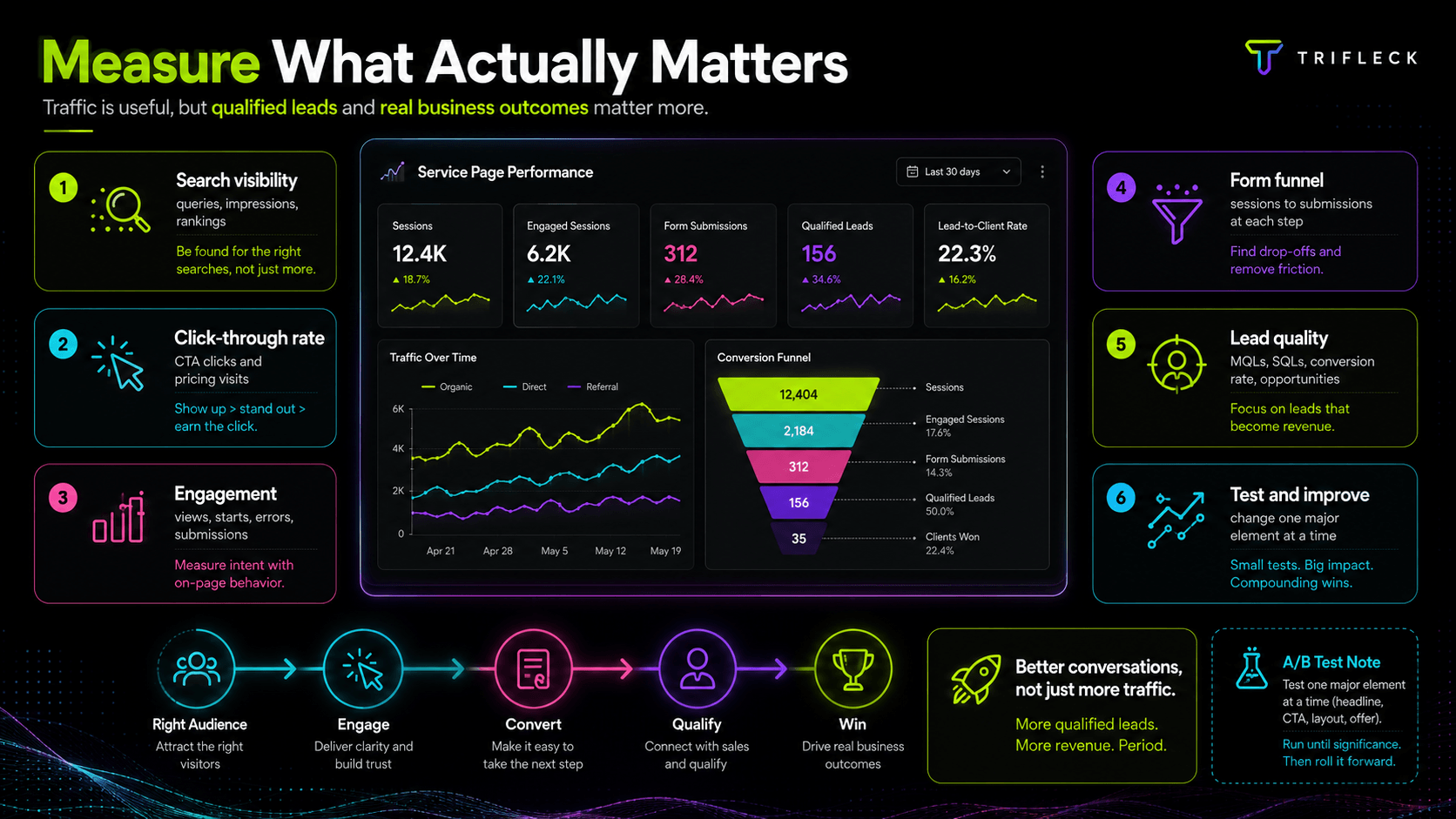
The real goal is to attract relevant visitors and turn them into qualified leads.
Monitor Search Visibility
Use Search Console to review search queries, impressions, average positions, and pages gaining visibility.
Look beyond total impressions. The page should appear for searches connected to the actual service and buyer intent.
Review Click-Through Performance
Compare impressions with clicks.
A low click-through rate may point to a weak title, unclear positioning, poor intent alignment, or an offer that does not stand out in the results.
Test titles carefully and keep them accurate.
Track Engagement With Important Sections
Measure actions that show growing interest.
These may include CTA clicks, pricing visits, case study clicks, phone taps, booking clicks, and form views.
This data can reveal where visitors gain confidence or lose interest.
Measure the Full Form Funnel
Do not track only completed forms.
Measure form views, starts, validation errors, abandonment, and successful submissions.
A page may attract strong leads while a long or confusing form quietly scares them away.
Connect Leads With Actual Sales Quality
A high lead count means little if most inquiries are irrelevant.
Track qualified leads, booked meetings, proposals, closed clients, revenue, and common rejection reasons.
This gives a more accurate view of service page SEO performance because it connects search traffic with business outcomes.
Test and Improve One Element at a Time
Test headlines, CTA wording, proof placement, form length, pricing presentation, section order, and supporting visuals.
Change one major element at a time. Otherwise, you may improve performance without knowing what caused it.
Also review the page regularly. Update outdated prices, screenshots, testimonials, links, services, and process details.
Final Thoughts
A strong service page does more than explain what a company offers.
It matches a clear search intent, defines the service, answers practical questions, provides proof, removes uncertainty, and makes the next step easy.
The best service page SEO combines structure, relevance, trust, usability, and measurement. When those elements work together, the page becomes easier to find and easier to choose.
That is the real goal. Not just more traffic, but better conversations with people who genuinely need the service.